Why this inventory will shape the Future of FiveM scripts
Your inventory is your FiveM server’s brain. Next-gen systems like Quasar Advanced Inventory and Compact Inventory bring modern UI, metadata and real RPG depth to ESX/QBCore servers, turning every item into part of the story - not just a slot in a grid.

If Your Inventory Feels Old, Your Whole Server Feels Old
Every serious FiveM server owner eventually hits the same wall:
- Players complain the inventory is clunky.
- Items don’t feel unique – just icons and labels.
- People dupe, exploit or lose items because the system is held together with duct tape.
- Staff spends hours debugging scuffed inventories instead of creating new content.
It doesn’t matter how good your housing, jobs, cars or drugs are…
If your inventory feels like 2018, your entire server feels stuck in 2018.
That’s why the current meta on FiveM is slowly moving toward next-gen inventory systems – and why solutions like Advanced Inventory and Compact Inventory from Quasar Store are influencing how servers are built in 2025. (Quasar Store)
The Problem With Old-School FiveM Inventories
Before talking about new systems, let’s be honest about the old ones.
1. No Real Identity for Items
Most legacy inventories treat items like:
- A name
- An icon
- A count
That’s it. No metadata, no durability, no individual story.
You can’t easily do things like:
- “This pistol has a serial number tied to this player.”
- “This fish was caught in this location with this rod.”
- “This ID card belongs to this citizen with this DOB.”
Without metadata, everything feels generic.
2. Slow, Clunky, Unintuitive UI
Many older inventories:
- Have no drag & drop
- Don’t scale well with high resolutions
- Look like debug tools, not in-world UIs
Players spend more time fighting the interface than playing.
And if your UI looks cheap, players subconsciously assume the server is cheap.
3. Performance and Integration Pain
Older inventories were not built for:
- High player counts
- Cross-framework use (ESX, QBCore, standalone)
- Complex integrations (phone, crafting, jobs, shops, etc.)
You end up with:
- Conflicts between scripts
- Ugly workarounds
- “Don’t touch that, it breaks the inventory” situations
For a platform as big as FiveM (powered by Cfx.re), that’s holding your project back. (fivem.net)
What a Next-Gen FiveM Inventory Looks Like in 2025
Modern inventories – the type that define the new meta – share a few traits:
Modern Grid UI + Drag & Drop
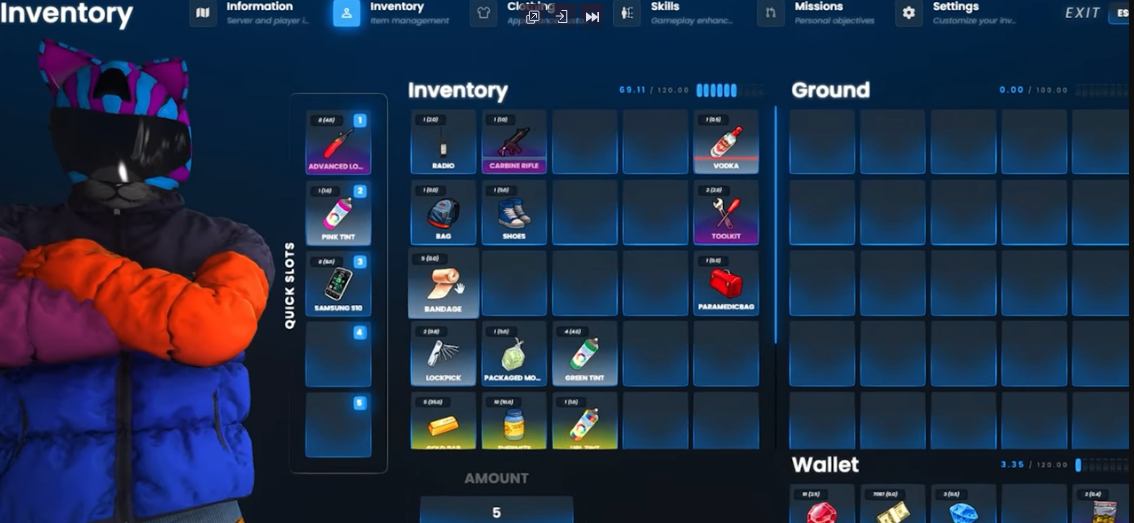
Systems like Quasar Advanced Inventory and Quasar Inventory 3.0 (Compact Inventory) use:
- Clean, grid-based layouts
- Drag & drop interactions
- Hotbars / quickbars for fast use
- Responsive design that looks good on all resolutions (Quasar Store)
This instantly makes your server feel premium, even before players see your jobs or cars.
Metadata-Driven Items
Next-gen inventories lean heavily on metadata. That means:
- Each item can hold extra data (serial, quality, owner, rarity…).
- Two pistols can be completely different “under the hood”.
- You can build complex mechanics (e.g. weapon wear, custom IDs, signed items, etc.)
This is the backbone of true RPG systems – your inventory becomes a database of stories, not just a list of objects.
Framework-Aware and Ecosystem-Friendly
Modern solutions are designed for the real world of FiveM:
- ESX & QBCore support out of the box
- Documentation for integrations
- Ecosystem of scripts that intentionally work with the same inventory logic (Quasar Store)
That’s where Quasar Store is positioning its inventory family.
Meet Quasar Advanced Inventory & Compact Inventory
Quasar Store is known for building large, interconnected systems for FiveM servers: housing, jobs, garages, phones, crafting, and more. (Quasar Store)
At the center of many of those setups, you’ll find their inventory solutions.
Quasar Advanced Inventory – RPG-Level Item Management
From the Quasar docs, Advanced Inventory is described as:
“A modern grid UI, drag & drop, quickbars, and realistic mechanics, making item management smooth, modular, and fully optimized.”
In practical terms for a server owner, that means:
- A full-screen grid inventory with drag & drop
- Hotbars and quick use slots
- Support for metadata so items can store extra details
- Built for ESX and QBCore
It’s not “just an inventory” – it’s the foundation for your entire gameplay loop.
You can see the overall script lineup (including Advanced Inventory) here:
- Quasar Store – Scripts Category:
https://www.quasar-store.com/category/scripts
And learn more via community tutorials and showcases on YouTube:
- Advanced Inventory video content:
https://www.youtube.com/@quasarstore/videos (YouTube)
Quasar Compact Inventory – Clean, Fast and Optimized
Compact Inventory (Quasar Inventory 3.0) is described in the docs as:
“A sleek, responsive UI with drag & drop, hotbars, and full logic—offering modern, fast, and highly optimized item management in FiveM.” (Quasar Store)
It’s ideal if:
- You want a cleaner, more minimal inventory that still feels premium.
- You care about performance and simplicity.
- You need something that fits many gamemodes and is easy for players to read at a glance.
Product page on the Tebex webstore (Quasar Store storefront):
- Compact Inventory package:
https://www.quasar-store.com/package/4770732 (Quasar Store)
Docs for configuration and integration:
- Compact Inventory docs:
https://docs.quasar-store.com/scripts/compact-inventory
How These Inventories Influence the FiveM Meta
They Turn Items Into Systems, Not Just Props
With metadata-driven inventories, you can build:
- Weapons with durability, serials and history.
- Food and drugs with potency, expiration dates and brands.
- Vehicles with keys as items, documents, insurance papers.
- Paperwork (licenses, IDs) as real items stored inside wallets/bags.
Suddenly your economy, law, crime and jobs all revolve around real data.
They Make Other Scripts Better
When your inventory is modern, everything else feels better:
- Housing scripts: stashes and storage feel natural and powerful.
- Drug systems: crops, lab products and packages become unique items.
- Crafting: recipes actually matter when items have meaningful metadata.
- Phones & apps: inventories can feed rich UIs and item-based actions.
Quasar’s catalog is built around this philosophy: most major systems are designed to plug naturally into a Quasar inventory core. (Quasar Store)
They Raise Player Expectations Across FiveM
When players try a server with a polished inventory (and supporting systems), going back to a default, text-only inventory feels like a downgrade.
That’s how meta shifts happen:
- A few servers adopt next-gen systems.
- Players start demanding similar quality elsewhere.
- Old setups gradually feel “unacceptable”.
If you want your FiveM project to be ahead of that curve, your inventory choice is huge.
From Cfx.re Server Slot to Real RPG World
At the platform level, FiveM (powered by Cfx.re) is already capable of incredible things: custom assets, synced worlds, advanced AI, all on top of GTA V. (fivem.net)
The question is: what do you build on top of that?
Your Inventory Is the Interface Between Players and Your World
Every:
- Heist,
- Job,
- Deal,
- Search,
- Robbery,
- Trade,
- Craft,
- Raid,
…sooner or later passes through the inventory.
If that feels slow, ugly or unreliable, the entire experience suffers.
A strong inventory like Quasar Advanced Inventory or Compact Inventory basically says:
“Everything you touch in this city has weight, data and consequences.”
That’s exactly what modern RP communities are looking for.
Installing Quasar Inventories: Tebex, Cfx & Docs
1. Get the Script via the Tebex Webstore
Quasar Store runs its storefront through Tebex:
- Quasar Store homepage:
https://www.quasar-store.com/ (Quasar Store)
Here you’ll find:
- Advanced Inventory
- Compact Inventory
- And other related systems (Smartphone PRO, Housing Creator, etc.). (Quasar Store)
When you purchase, the asset is attached to your Tebex/Cfx account automatically.
2. Check Your Granted Assets on the Cfx Portal
Like all Tebex-powered resources for FiveM, your licenses are visible via the Cfx portal:
- Cfx.re asset portal:
https://portal.cfx.re/assets/granted-assets
This is where you confirm your resources are registered to your account and ready for your server.
3. Follow Official Documentation and Video Guides
For setup, always lean on official docs:
- Quasar Docs – Portal:
https://docs.quasar-store.com/ - Advanced Inventory & Compact Inventory sections are listed under “Scripts”.
Plus, you can follow installation videos and showcases on YouTube for extra clarity:
- Quasar Store YouTube channel:
https://www.youtube.com/@quasarstore/videos (YouTube)
FAQ – Next-Gen Inventories for FiveM (Advanced & Compact)
Is a premium inventory really worth it for my FiveM server?
If you’re running a serious project, yes. The inventory is used in almost every interaction: looting, trading, crafting, storing, stealing. A weak inventory creates daily frustration; a strong one becomes a selling point for your server.
What’s the difference between Advanced Inventory and Compact Inventory?
- Advanced Inventory focuses on a full, modern grid UI with deep features and an RPG feel.
- Compact Inventory (Inventory 3.0) focuses on a sleek, fast and more minimal layout while keeping drag & drop, hotbars and metadata support. (Quasar Store)
Both are built for ESX/QBCore, so the choice is more about style and complexity than compatibility.
Do these inventories work with ESX and QBCore?
Yes. Quasar’s inventory solutions are explicitly built for ESX & QBCore frameworks, with documentation guiding you through integration. (Quasar Store)
Can I integrate other scripts with Quasar inventories?
Yes. Many community and premium scripts already support qs-inventory / Quasar Inventory, especially older v2 versions. For v3 (Compact Inventory) and Advanced Inventory, you can either:
- Use built-in integrations documented by Quasar, or
- Adapt resources by working with item metadata and exports. (docs.kuzquality.com)
Will switching inventories break my server?
Any inventory migration needs planning. You should:
- Test on a staging server.
- Migrate items and character data carefully.
- Gradually introduce the new system to your community.
But in the long run, moving to a modern inventory often reduces bugs and support tickets.
How does this help my FiveM server stand out?
Most players have seen generic inventories a thousand times. When they join a server with:
- A clean, modern UI,
- Items that actually feel unique,
- Deep integration with jobs, housing, crime and progression,
they immediately feel they’re in a next-generation FiveM city. That’s what keeps them from returning to the server list.